本文基于 React Native 0.51.0 版本 iOS 平台进行分析。
背景
在 iOS 13 上,遇到一个偶现的闪退问题,定位到React Native 原生模块某一行代码有问题:

-[UIApplication delegate] must be used from main thread only 这句提示是从 Xcode Main Thread Checker 工具抛出,Main Thread Checker 在 debug 时检测 APPKit & UIKit 和其他相关的 API 有没有在后台线程非法使用。
解决方案
看一看官方 - native-modules-ios#threading
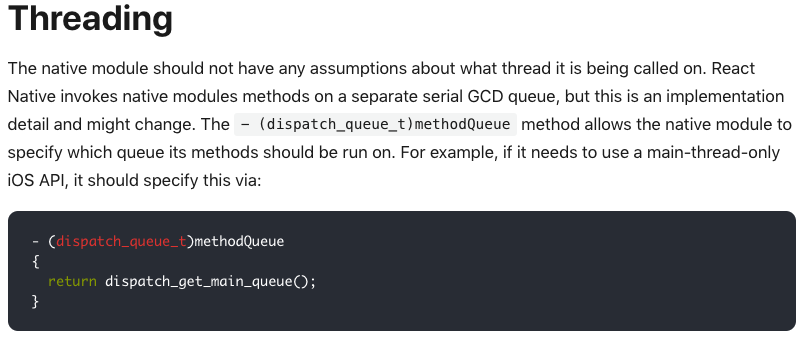
简而言之,调用原生模块时,无法确定运行所处线程,因为 RN 是在一个独立的串行 GCD 队列中调用原生模块的方法。想要指定运行队列,可以在原生模块的- (dispatch_queue_t)methodQueue指定。暴力一点,甚至可以在目标代码行直接指定。
源码解读
以官网的 CalendarManager 原生模块为例
// CalendarManager.h
#import <React/RCTBridgeModule.h>

@interface CalendarManager : NSObject <RCTBridgeModule>
@end
#import "CalendarManager.h"
#import <React/RCTLog.h>

@implementation CalendarManager

RCT_EXPORT_MODULE();

RCT_EXPORT_METHOD(addEvent:(NSString *)name location:(NSString *)location)
{
  RCTLogInfo(@"Pretending to create an event %@ at %@", name, location);
}

@end
在 RN 端,调用方式如下
import {NativeModules} from 'react-native';
var CalendarManager = NativeModules.CalendarManager;
CalendarManager.addEvent('Birthday Party', '4 Privet Drive, Surrey');
module 信息的注入
NativeModules 的 CalendarManager 属性从何而来?在 JS 端 NativeModules.js,可以看到 NativeModules 指向 global 对象的 nativeModuleProxy 属性。
// NativeModules.js
let NativeModules : {[moduleName: string]: Object} = {};
if (global.nativeModuleProxy) {
  NativeModules = global.nativeModuleProxy;
} else {
  // 此分支是远程模式调用
  ...
}
其中,global是 jscore 给 JS 注入的全局对象,nativeModuleProxy 是原生模块的代理,在创建JSCExecutor(JS代码执行器)时注入。
JSCExecutor::JSCExecutor(std::shared_ptr<ExecutorDelegate> delegate,
                             std::shared_ptr<MessageQueueThread> messageQueueThread,
                             const folly::dynamic& jscConfig) throw(JSException) :
    m_delegate(delegate),
    m_messageQueueThread(messageQueueThread),
    m_nativeModules(delegate ? delegate->getModuleRegistry() : nullptr),
    m_jscConfig(jscConfig) {
      // 创建了全局 JSGlobalContext(js里面的global对象)
      initOnJSVMThread();

      {
        SystraceSection s("nativeModuleProxy object");
        // 给 global 对象注入 nativeModuleProxy 属性
        installGlobalProxy(m_context, "nativeModuleProxy",
                           exceptionWrapMethod<&JSCExecutor::getNativeModule>());
      }
    }
JS 端发起 module 调用时,有如下调用栈
JSCExecutor::getNativeModule()
JSCNativeModules::getModule()
JSCNativeModules::createModule()
  ModuleRegistry::getConfig()
    RCTNativeModule::getMethods()
      [RCTModuleData methods]
最后一个关键方法调用 [RCTModuleData methods],在源码中判断 module 中的方法是否含有__rct_export__前缀
if ([NSStringFromSelector(selector) hasPrefix:@"__rct_export__"]) {
  IMP imp = method_getImplementation(method);
  auto exportedMethod = ((const RCTMethodInfo *(*)(id, SEL))imp)(_moduleClass, selector);
  id<RCTBridgeMethod> moduleMethod = [[RCTModuleMethod alloc] initWithExportedMethod:exportedMethod
                                                                         moduleClass:_moduleClass];
  // 添加至方法列表
  [moduleMethods addObject:moduleMethod];
}
__rct_export__是通过宏RCT_EXPORT_METHOD拼接的,最终在 JS 端可以获取 CalendarManager 的 addEvent 方法。
原生处理 JS 的调用
在 JS 端发起原生模块方法调用时,查看原生调用栈
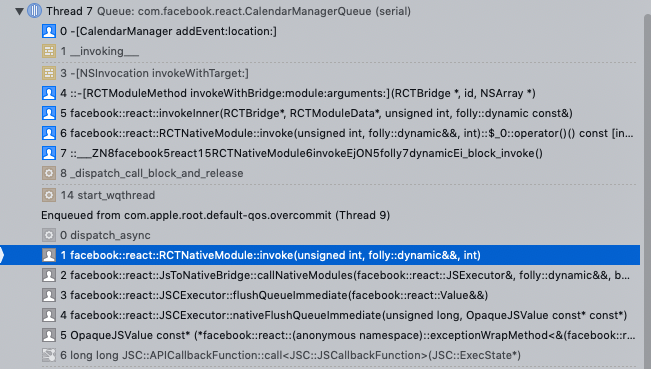
在调用栈中找到关键调用函数 RCTNativeModule::invoke
void RCTNativeModule::invoke(unsigned int methodId, folly::dynamic &¶ms, int callId) {
__weak RCTBridge *weakBridge = m_bridge;
__weak RCTModuleData *weakModuleData = m_moduleData;
// 原生 module 的调用
dispatch_block_t block = [weakBridge, weakModuleData, methodId, params=std::move(params), callId] {
#ifdef WITH_FBSYSTRACE
if (callId != -1) {
fbsystrace_end_async_flow(TRACE_TAG_REACT_APPS, "native", callId);
}
#endif
invokeInner(weakBridge, weakModuleData, methodId, std::move(params));
};
// 获取模块指定的 methodQueue
dispatch_queue_t queue = m_moduleData.methodQueue;
if (queue == RCTJSThread) {
block();
} else if (queue) {
dispatch_async(queue, block);
}
}
调用 module 方法前先获取 methodQueue。注意到此处判断如果队列类型为 RCTJSThread则直接执行 block,否则在指定的队列中异步执行方法调用。
RCTJSThread是在 RCTBridge 中定义的一个私有 dispatch_queue_t 属性,如下所示。它没有进行队列创建的操作,而是指向 KCFNull。
dispatch_queue_t RCTJSThread;

+ (void)initialize
{
  static dispatch_once_t onceToken;
  dispatch_once(&onceToken, ^{

    // Set up JS thread
    RCTJSThread = (id)kCFNull;
  });
}
RCTJSThread 实际上是用来做标记在 React JS 线程执行的,从名字可以看出,因为 RCTNativeModule::invoke 调用是在 React 创建的 JS 线程执行。如果原生模块的 methodQueue 返回 RCTJSThread,说明该模块的方法需要在 JS 线程中执行,RN 内置的2个 module 采用这种实现方式:RCTEventDispatcher、RCTTiming。
methodQueue 设置
module 队列将会在模块实例化时通过 RCTModuleData - setUpMethodQueue 进行设置
- (void)setUpMethodQueue
{
  if (_instance && !_methodQueue && _bridge.valid) {
    RCT_PROFILE_BEGIN_EVENT(RCTProfileTagAlways, @"[RCTModuleData setUpMethodQueue]", nil);
    BOOL implementsMethodQueue = [_instance respondsToSelector:@selector(methodQueue)];
    if (implementsMethodQueue && _bridge.valid) {
      _methodQueue = _instance.methodQueue;
    }
    if (!_methodQueue && _bridge.valid) {
      // 创建名为 com.facebook.react.[moduleName]Queue 的串行队列
      _queueName = [NSString stringWithFormat:@"com.facebook.react.%@Queue", self.name];
      _methodQueue = dispatch_queue_create(_queueName.UTF8String, DISPATCH_QUEUE_SERIAL);

      // assign it to the module
      if (implementsMethodQueue) {
        @try {
          [(id)_instance setValue:_methodQueue forKey:@"methodQueue"];
        }
        @catch (NSException *exception) {
          ...
        }
      }
    }
    RCT_PROFILE_END_EVENT(RCTProfileTagAlways, @"");
  }
}
总结
创建 NativeModule 时需要注意方法调用的线程限制,通过- (dispatch_queue_t)methodQueue可以模块运行的队列。